8.5 eSIM Identity & Device Migration
Binding telecom identity to cryptographic authority
This section explains how PTERI integrates with eSIM infrastructure to prevent fraud, bind Web2 accounts to cryptographic wallets, and enable secure device migration.
Overview
In this model:
- A Web2 account is linked to a wallet address.
- That wallet address is bound to an eSIM (eSIM A).
- The eSIM acts as a continuity signal across devices.
- Device verification is performed using signed messages — not shared secrets.
This allows:
- Strong fraud prevention
- Device-based identity
- Secure migration
- No reliance on passwords
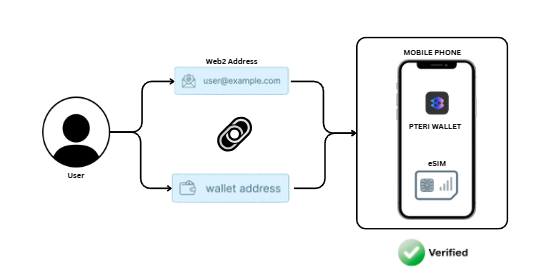
WORKING OF eSIM
Flowchart 1 — How the eSIM Verification Works
Initial Setup
Step 1 — Account Binding
- User has a Web2 account.
- That account is linked to a wallet address.
- The wallet is associated with eSIM A.
Result:
Web2 Account → Wallet Address → eSIM A
Step 2 — Authentication Request
On a mobile phone with:
- PTERI Wallet installed
- eSIM A active
The phone initiates an authentication request.
Instead of generating a normal OTP, the device:
- Signs a message using the wallet’s private key.
- Generates an OTP derived from that signed message.
- Sends the signed payload to the server.
Step 3 — Server Verification
The server:
- Receives the signed message
- Verifies the signature using the wallet address
- Confirms the wallet matches the Web2 account
- Confirms eSIM binding
If valid:
- The device becomes a VERIFIED PHONE
- Future authentication can use the same signature-based OTP mechanism
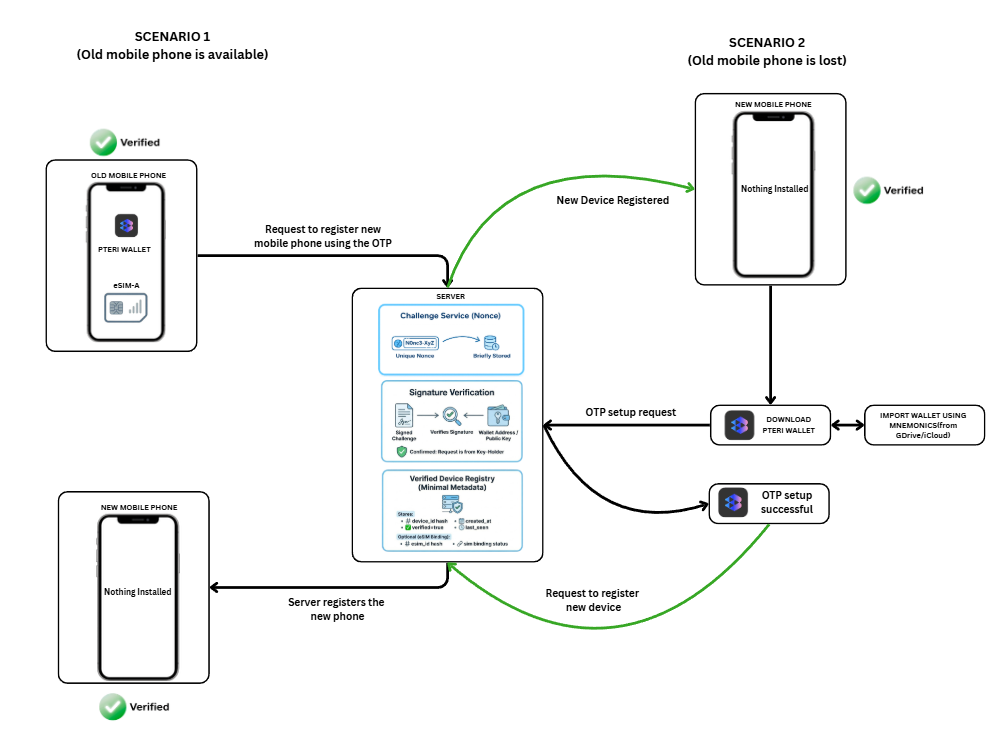
SOLUTION TO FRAUD & DEVICE MIGRATION
Flowchart 2 — Fraud Prevention & Device Migration
This section describes two migration scenarios.
Scenario 1 — Old Device Available
You have:
- Old Mobile Phone (Verified + eSIM A)
- New Mobile Phone (Unverified)
Step 1 — Initiate Registration
On the old verified device:
- User requests to register new device.
- Device signs a migration message using its wallet.
- Server receives the signed request.
Step 2 — Server Validation
Server verifies:
- Signature matches wallet
- Wallet matches Web2 account
- Request originates from a verified device
Step 3 — Register New Device
Server:
- Registers the new device
- Marks it as verified
- Optionally revokes the old device (if requested)
Result:
New Mobile Phone → VERIFIED
No passwords.
No SMS.
No shared secrets.
Scenario 2 — Old Device Lost
You have:
- Only a New Mobile Phone
Step 1 — Install PTERI Wallet
User downloads the PTERI Wallet on the new device.
Step 2 — Import Wallet
User imports wallet using:
- Mnemonics (manual backup)
- Or encrypted backup (iCloud / Drive, if enabled)
This restores wallet authority locally.
Step 3 — Identity Authentication
The wallet:
- Signs an authentication message
- Sends it to the server
- Proves control of the wallet
Server verifies signature.
Step 4 — Re-establish OTP
The wallet re-initializes the signature-based OTP mechanism.
Step 5 — Register New Device
Wallet sends a signed registration request.
Server:
- Validates signature
- Confirms wallet continuity
- Registers new device
- Marks device as VERIFIED
Migration complete.
Why This Prevents Fraud
This system eliminates:
- SIM-swap-only attacks
- OTP interception
- Shared-secret replay
- Password resets
- Phishing-based takeover
Because:
- Authority always requires wallet signature
- OTP is derived from signed message
- Server never trusts telecom signals alone
- eSIM acts as continuity signal — not sole authority
Security Model Summary
| Layer | Purpose |
|---|---|
| Wallet Signature | Proves authority |
| eSIM Binding | Proves continuity |
| Server Verification | Enforces policy |
| Litecoin | Provides deterministic verification & optional block anchoring |
No single layer can take over the system.
Design Principles
- No private keys stored on server
- No plaintext mnemonics transmitted
- No reliance on SMS OTP
- Device authority is always cryptographic
- Migration requires explicit proof of wallet control
Why This Model Matters
This approach bridges:
- Web2 identity systems
- Telecom infrastructure
- Decentralized cryptographic authority
It allows enterprises to:
- Upgrade security without replacing Web2 accounts
- Prevent SIM-swap fraud
- Enable seamless device migration
- Maintain non-custodial control